
🧭 Introduction
Managing multiple bots or reusing successful automation flows is seamless with Zoe Agent. You can duplicate, export, or import any WhatsApp bot reply flow in seconds. This allows you to replicate high-performing bots for different pages, resellers, or campaigns without starting from scratch.
This guide covers three essential actions:
- Duplicating a bot flow within your account.
- Exporting a bot flow as a file.
- Importing a bot flow using a text/JSON file.
💡 Use Cases
- Scale Fast: Deploy the same flow across different WhatsApp numbers.
- Safety First: Create backups of your critical bot workflows.
- Collaborate: Share bot structures with team members or clients.
- Efficiency: Speed up setup for reseller clients by reusing templates.
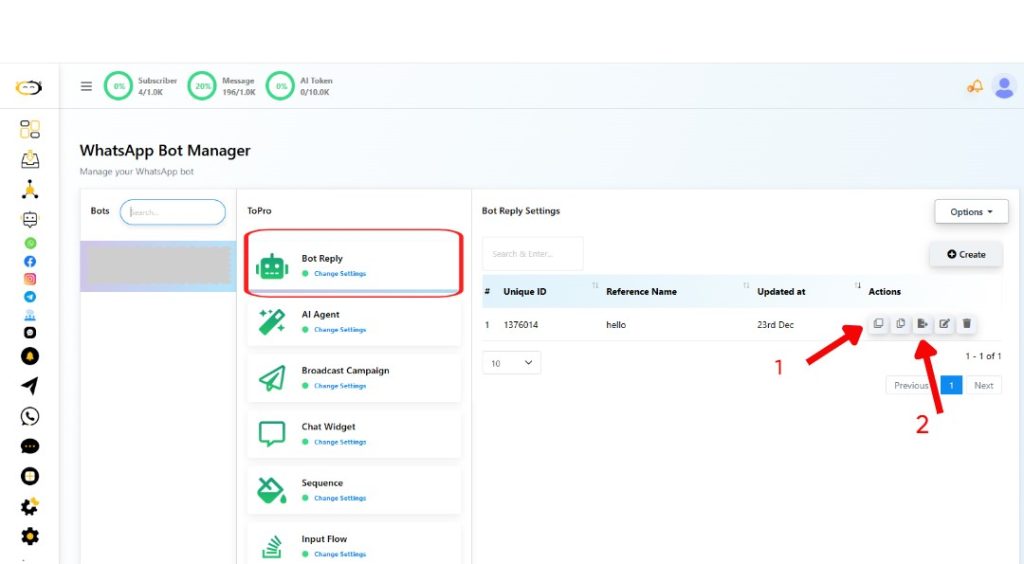
🔁 Step 1: Duplicate a Bot Flow
To clone a bot flow for use with the same WhatsApp number:
- Navigate to the Chatbot Manager (robot icon) and select WhatsApp Bot.
- Select your connected WhatsApp number.
- Click on Bot Reply and find the flow you want to copy.
- Click the Duplicate icon (📄) in the action row.
- A copy will be created immediately for you to edit.
📤 Step 2: Export a Bot Flow
To save a flow for use on a different account or number:
- In the Bot Reply list, find your target flow.
- Click the Export icon.
- A
.txtfile containing the flow structure will download automatically.
🛡 Note: API keys, template IDs, and tokens are excluded from the export to maintain security.
📥 Step 3: Import a Bot Flow
To upload and reuse an exported flow:
- Inside the Bot Reply section, click the Options dropdown (top-right).
- Select Flow Import.
- Upload your
.txtfile. - Your flow will appear in the list. Ensure any required WhatsApp templates are set up before activating it.
📌 Summary Table
| Action | How to Trigger | Purpose |
| Duplicate | Duplicate Icon | Create a copy of an existing bot |
| Export | Export Icon | Save the flow as a file for external use |
| Import | “Flow Import” | Upload and reuse a bot flow |
❓ FAQs
Can I duplicate a flow to a different WhatsApp number?
Yes, as long as the new number is connected to your Zoe Agent account and has access to the required templates.
What if my exported bot uses a template that doesn’t exist in the new number?
The bot will not function properly until you reassign or recreate those specific templates under the new number.
Are variables and conditions included in the export?
Yes, all logic, buttons, conditions, and variable references are preserved, though sensitive credentials are stripped for safety.


