
The Input Flow feature in Zoe Agent allows you to gather structured information from users directly through the chatbot. Whether you are collecting emails, phone numbers, feedback, or booking details, Input Flow guides users through a set of dynamic, customizable questions.
It transforms your chatbot into an interactive form, perfect for WhatsApp, Facebook Messenger, Telegram, Instagram, or web chatbots. Responses are stored neatly in custom fields, system fields, Google Sheets, or sent via webhooks.
What is an Input Flow?
An Input Flow is a campaign within Zoe Agent where you design a sequence of questions. Each user’s reply is captured and stored for CRM use, spreadsheet syncing, or external integrations.
The core components include:
- Campaign Name: A label to keep your flows organized.
- Questions: Supports both free text and multiple-choice formats.
- Custom/System Fields: Designated locations to save each response.
- Integrations: Optional syncing with Google Sheets or external Webhooks.
✅ Ideal Use Cases
- Lead Generation: Collecting email addresses and phone numbers.
- Appointment Booking: Gathering dates, times, and service preferences.
- Feedback & Surveys: Running multi-step customer satisfaction forms.
- Support Intake: Asking structured questions to save human agent time.
Step-by-Step Setup
Create a New Flow: Go to the Input Flow module and click “Add new input flow”.
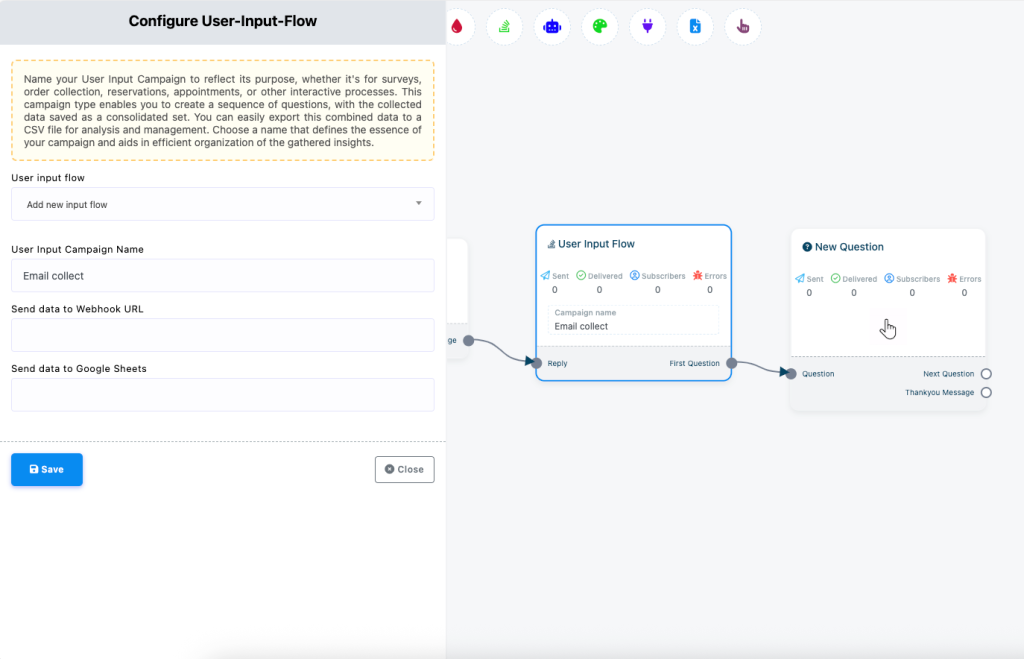
Add Questions: Connect a new question block and choose between Free Keyboard Input (text) or Multiple Choice (buttons).
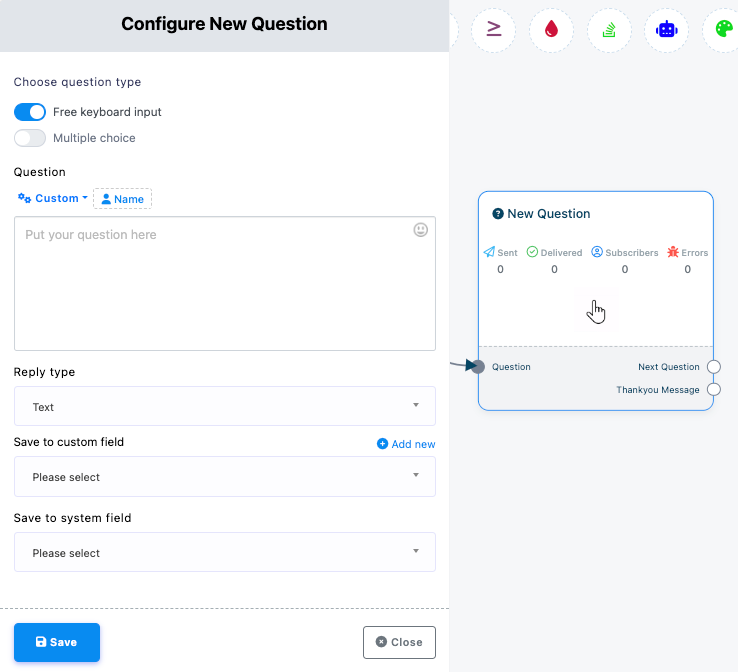
Save Responses: Map each question to a Custom Field (your own defined data field like email, phone, etc.) or System Field (built-in system fields like subscriber ID, name).
You can also enable a Webhook URL or connect to Google Sheets here.
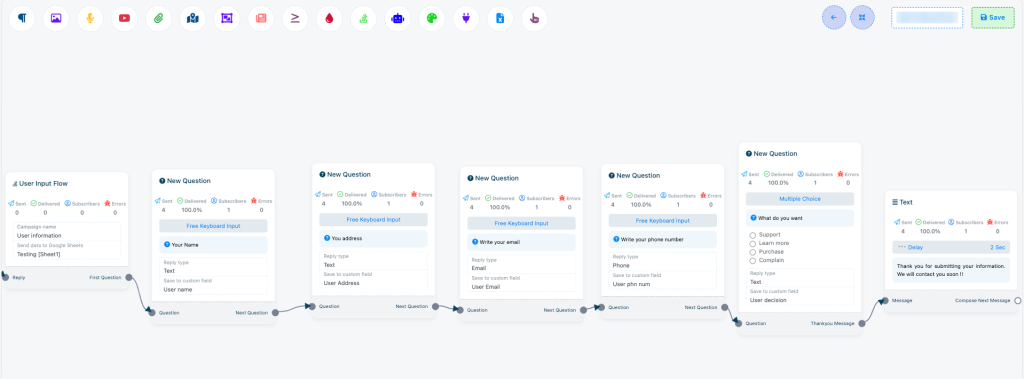
Finalize: Click Save to store the flow. It is now ready to be used in any bot sequence or automation.
Use Cases
The Input Flow feature transforms your chatbot into a powerful data-gathering tool. Here are the most effective ways to use it within Zoe Agent:
Support Intake: Use structured questions to identify a customer’s issue upfront, significantly reducing the time required by human agents.
Lead Generation: Automatically capture essential contact details like emails or phone numbers and immediately trigger follow-up sequences.
Appointment Booking: Simplify scheduling by asking users for their preferred date, time, and specific service choice directly in the chat.
Customer Surveys: Deploy multi-step feedback forms to understand customer satisfaction and collect detailed insights.
Order Collection: Gather specific customer preferences or order details before routing the information to your sales team for fulfillment.
💡 Pro Tips
- Be Concise: Keep questions short to prevent user drop-off.
- Smart Tracking: Use custom fields to track data across your entire automation ecosystem.
- Optional Answers: Use the “Skip Button” in Multiple Choice questions if the information isn’t mandatory.
- Automation: Combine flows with sequences and tags to trigger automatic follow-ups based on user data.
FAQs
Can I use Input Flow across all platforms?
Yes, it works across WhatsApp, Facebook, Instagram, Telegram, and web chat.
Where is the data stored?
Data can be saved in custom/system fields, synced to Google Sheets, or exported as a CSV.
Can I trigger automation based on responses?
Absolutely. You can use conditional logic, sequences, or tags based on how the user answers.


